When Your Kid Asks “Why?” and You Have NO Idea (here’s what I do)

To use AI for homework help:
1. Open ChatGPT or Claude (free versions work)
2. Use this prompt: "Explain [concept] to a [grade level] student using simple language and a real-world example"
3. Read the AI's explanation
4. Explain it to your child in your own words
5. AI helps you understand, you help them learn
Let’s talk about that special moment when your kid asks you a question and you realize you either:
A) Never learned this in the first place
B) Learned it 20+ years ago and your brain said “we’re deleting this to make room for song lyrics from 2003”
C) Know the answer but have absolutely no idea how to explain it in a way a kid would understand
That moment.
(My first grader doesn’t get homework yet, but trust me, she asks plenty of questions that make me think “hmmm… let me Google that real quick.”)
The Answer Helper That Makes You Sound Smart (Even When You’re Not)

Here’s my dilemma: I want to answer my daughter’s questions thoughtfully, but I also don’t want to:
Say “I don’t know” seventeen times a day
Give a confusing explanation that leaves her more confused
Default to “ask your dad” every single time
Pull out my phone to Google it while she watches me clearly not know the answer
Enter: AI as the world’s most patient explainer who never makes you feel dumb, and helps you sound like you actually know things.
The Master Question-Answering Prompt
“Explain [concept/topic] to a [age] year old using simple language and a real-world example. Make it clear and relatable.”
Real Examples You Can Use Today
For “Why” Questions:
“Explain why the sky is blue to a 6 year old using simple language and a real-world example. Make it clear and relatable.”
What you get: An explanation that actually makes sense to little kids (not a physics lecture about wavelengths).
For Older Kids’ Homework:
“Explain how to add fractions with different denominators to a 5th grader using simple language and a real-world example. Make it clear and relatable.”
What you get: A kid-friendly explanation that actually makes sense (unlike your panicked “hmm… you just… carry the… thing?”)
For Science Curiosity:
“Explain how rain forms to a 7-year-old using simple language and a real-world example. Make it fun and relatable.”
What you get: An explanation you can actually understand first, then explain to them in your own words.
For Reading Help (Older Kids):
“Summarize Chapter 5 of [book title] in simple terms for a 3rd grade reader. Then give me 3 discussion questions to help them think deeper about it.”
What you get: A summary that helps YOU understand what happened (because let’s be honest, you haven’t read it) AND questions that make you sound like you totally did.
For Creative Projects:
“Give me 5 creative project ideas for a [age] year old who loves [interest]. Make them simple to do at home with basic supplies.”
What you get: Ideas that keep them busy and learning without you having to invent activities on the spot.
The Important Part (a.k.a. Using AI Without Feeling Guilty)
You’re not using AI to avoid parenting or to make your kid stop asking questions. You’re using it to give BETTER answers than “I don’t know, sweetheart” or a confusing explanation that makes them more confused.
For younger kids (like mine):
AI helps me understand the topic first
Then I explain it to her in my own words
It’s like having a parenting Wikipedia that speaks human
For older kids with actual homework:
AI helps them UNDERSTAND concepts (helpful)
AI doesn’t do their work FOR them (that’s the line)
Think of it like a tutor, not a cheating tool
You’re still the parent. You’re still there. You’re just using a tool to be more helpful.
This Week’s Micro-Tip
When AI gives an explanation and your kid STILL doesn’t get it (or gives you that blank stare), try:
AI will reframe the entire concept around what they actually care about.
My daughter understands weather patterns way better when they’re explained using her stuffed animals. Don’t ask me why. It just works.
Real Questions My Daughter Has Asked (And AI Helped Me Answer)

“Why do we have to sleep?”
I asked AI to explain it using her love of horses
Suddenly she understood: “Horses need rest to have energy to run fast. Your brain needs rest to learn and remember things!”
“Where does the sun go at night?”
AI gave me a simple explanation using a ball and a flashlight
I actually understood it well enough to demonstrate
“Why is grass green?”
AI explained chlorophyll using terms a 6-year-old gets
She was satisfied and moved on (miracle!)
“How do airplanes stay in the sky?”
AI broke it down with the swimming analogy
Even I learned something new
For Older Kids: The Homework Balance
If your kids are old enough for real homework, here’s the line:
✅ Using AI to UNDERSTAND concepts = helpful
✅ Using AI to see step-by-step examples = learning
✅ Using AI to break down confusing instructions = smart
❌ Using AI to write their essay = cheating
❌ Copying AI answers directly = definitely cheating
Think of AI like a tutor: It helps them learn and understand, but they still do their own work.
The Prompts I Recommend
“Walk me through how to solve [type of problem] step by step for a [grade level] student. Don’t give the answer, teach the process.”
“Explain [science concept] to a [age] year old using simple language and something they can see in everyday life.”
“Summarize [chapter/book] in simple terms for a [grade level] reader. Include 3 questions that help them think about what they read.”
“Give me 5 creative writing prompts about [topic] for a [grade level] student. Make them fun and imaginative.”
“Explain [topic] to a [age] year old like you’re talking to a curious kid. Use a real-world example they can relate to.”
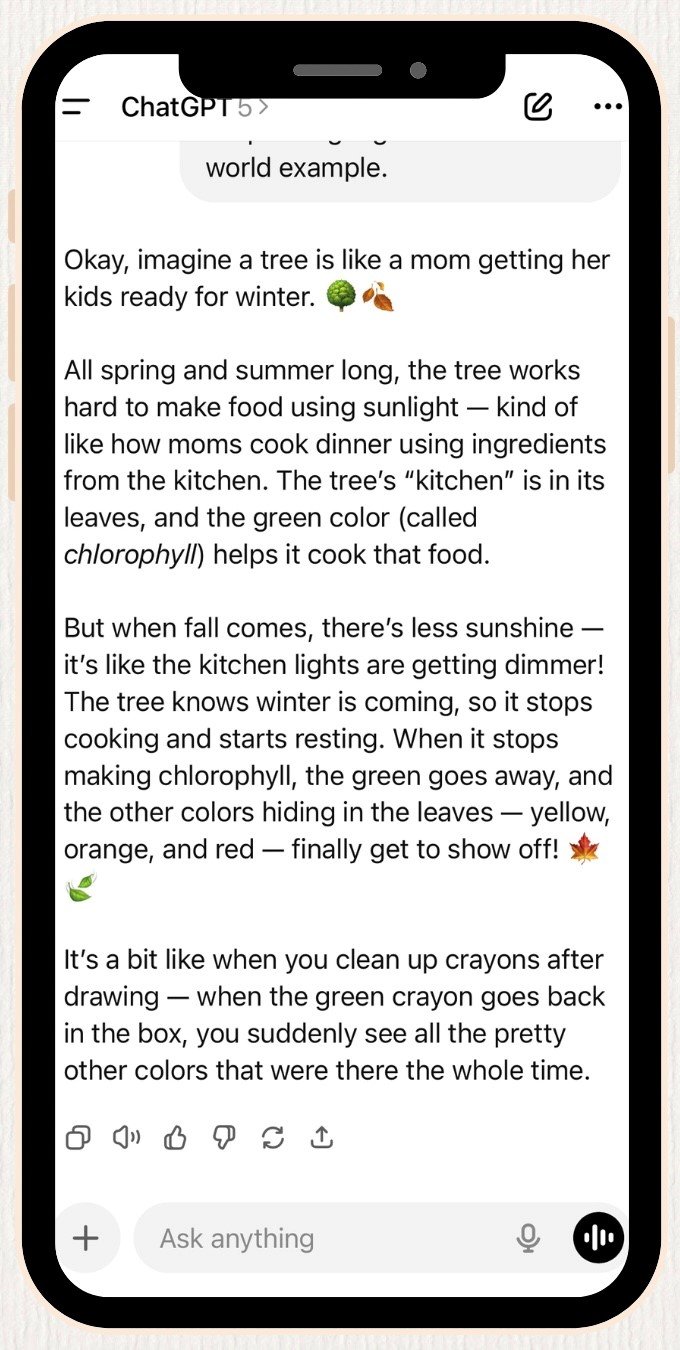
What This Actually Looks Like in Real Life
Daughter: “Mom, why do leaves change colors?”
Me (internally): I know this has something to do with… chlorophyll? Or… seasons? Help.
Me (actually): “That’s such a good question! Let me think about how to explain it…”
Opens ChatGPT while stirring pasta.
Me to ChatGPT: “Explain why leaves change color in fall to a 6 year old using simple language and a real-world example.”
Read response.
Daughter: “Ohhh! So the colors were there the whole time?”Me: “Exactly!”
Total time: 2 minutes. Parenting win.
The Question I Get Asked Most
“Isn’t this teaching my kid to rely on AI instead of thinking for themselves?”
Here’s my take:
You’re not handing your kid a phone and saying “ask ChatGPT.”
You’re:
Using AI to give YOU better information
Explaining it to them in your own words
Still having the conversation with them
Teaching them through your explanation
It’s no different than:
Looking something up in an encyclopedia (remember those?)
Googling it
Watching an educational video together
The tool changed. The parenting didn’t.
You’re still the one doing the explaining, the connecting, the teaching. AI just helps you do it better.
✨byte size takeaway✨
You don’t have to know everything to be a good parent. But you do need to know how to find good answers and explain them in a way your kid understands.
AI is just a tool that helps you do that faster and better than frantically Googling while your kid watches you clearly not know the answer.
Use it to be the helpful, patient, knowledgeable parent you want to be, even when you’re running on 4 hours of sleep and can’t remember the last time you had a thought that wasn’t interrupted.
What question from your kid has stumped you recently? The sky being blue? Where babies come from? Why we can’t have ice cream for breakfast? (Still working on a good answer for that last one.)
✨
Drop a comment or DM me on Instagram @bytesizemom, I’d love to hear what you’re navigating.
And if you try one of these prompts this week, tell me how it goes. Did it actually help? Did your kid understand it? Did you feel like a genius parent for approximately 3 minutes? I want to hear it all.
✨
Want more AI prompts for everyday mom life? Check out: